Cardz.game User Guide
🎯 What you will learn
Section titled “🎯 What you will learn”- What Cardz.game is.
- Where to click first.
- How to avoid the most common mistakes.
- Which page to open when you have a question.
🧒 Super simple version
Section titled “🧒 Super simple version”Cardz.game is like an online pack-opening table. Pick a pack, read the odds, open it, then manage the result in My Backpack.
🖼️ Screen guide
Section titled “🖼️ Screen guide”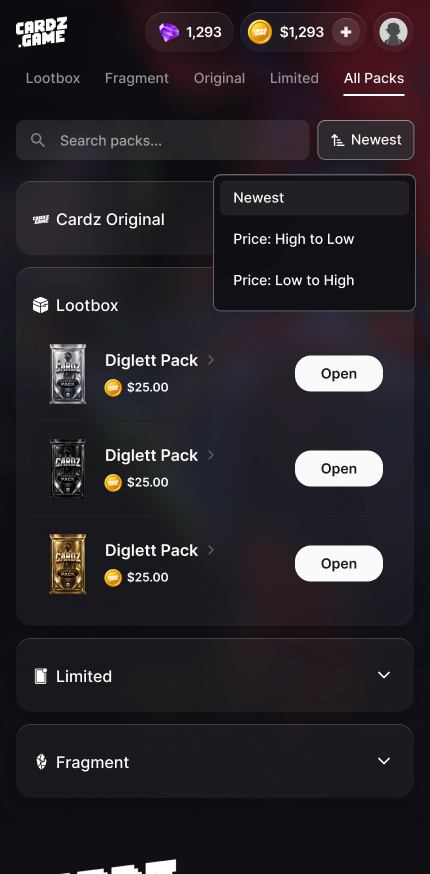
Follow the picture:
- Click
All Packsto see everything. - Use
Lootbox,Fragment,Original, orLimitedonly when you already know what you want. - Open a pack detail page before spending anything.
✅ Step-by-step
Section titled “✅ Step-by-step”Step 1: Start with All Packs.
Section titled “Step 1: Start with All Packs.”Look for the pack name, price, and status. Do not tap the first bright card image without reading.
Step 2: Open the pack detail page.
Section titled “Step 2: Open the pack detail page.”Read DROP RATES, CHASE CARDS, Expected Value, and Max Value.
Step 3: Manage the result.
Section titled “Step 3: Manage the result.”After opening, check My Backpack, then decide whether to keep, ship, sell back if eligible, or open another pack.
🔎 UI labels you may see
Section titled “🔎 UI labels you may see”| UI label | Plain meaning | What to do |
|---|---|---|
All Packs | All available packs | Use this as your default starting point. |
Open Now | Start opening or payment confirmation | Only tap after checking odds and price. |
My Backpack | Your card/item area | Use it to find opened cards, fragments, and actions. |
Add Funds / Deposit | Add balance | Check network and currency before sending funds. |
🧯 If you feel stuck
Section titled “🧯 If you feel stuck”- If you cannot find a button, search this guide for the exact English label.
- If the app screen is different from this guide, follow the current app screen first and contact support if money or shipping is involved.
⚠️ Important notes
Section titled “⚠️ Important notes”- Pack openings are random.
- Completed openings are usually final.
- Never share private keys, recovery phrases, passwords, or wallet secrets.
🙋 Tiny questions people ask
Section titled “🙋 Tiny questions people ask”| Question | Simple answer |
|---|---|
| Where are my cards? | Check My Backpack first, then check Cardz Activity. |
Are Fragments the same as Lootbox? | No. Fragments are fragments; Lootbox is a pack type. |
✅ Before you continue
Section titled “✅ Before you continue”Do these tiny checks before you tap the next button:
- You know which pack you are opening.
- You know where opened cards appear.
- You can find support before confirming money or shipping actions.