Shipping
🎯 What you will learn
Section titled “🎯 What you will learn”- How to choose cards for shipping.
- What to check in the address form.
- What
Importer of Recordmeans. - How to read order status.
🧒 Super simple version
Section titled “🧒 Super simple version”Shipping means sending a physical card to an address. If the address is wrong, the package can be delayed or lost.
🖼️ Screen guide
Section titled “🖼️ Screen guide”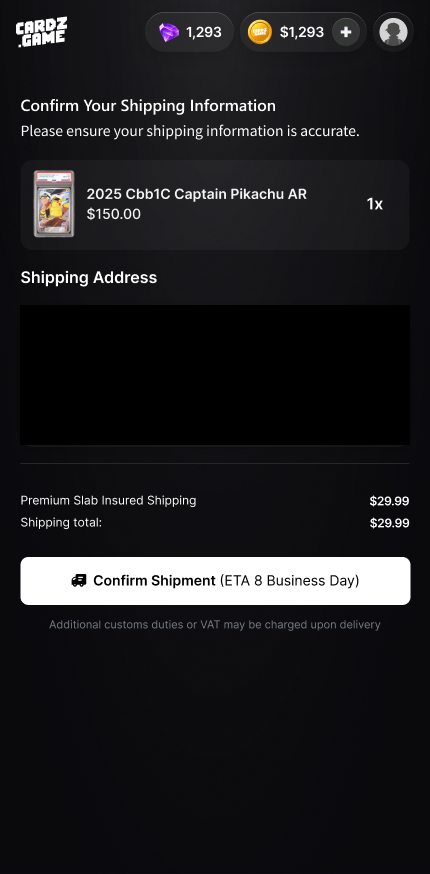
Follow the picture:
- Check the selected card/item.
- Check name, country/region, address, phone, and fee.
- Submit only when every field is correct.
✅ Step-by-step
Section titled “✅ Step-by-step”Step 1: Select the item.
Section titled “Step 1: Select the item.”Start from My Backpack and choose the physical card/item you want shipped.
Step 2: Fill address slowly.
Section titled “Step 2: Fill address slowly.”Use the address format your local postal service expects. Include apartment, unit, postal code, and phone if required.
Step 3: Confirm shipping.
Section titled “Step 3: Confirm shipping.”Check fees, customs/VAT notes, and order summary before final confirmation.
Step 4: Track status.
Section titled “Step 4: Track status.”Use order status or support if the package does not move for a long time.
🔎 UI labels you may see
Section titled “🔎 UI labels you may see”| UI label | Plain meaning | What to do |
|---|---|---|
Ship | Start shipping request | Use from an eligible Backpack item. |
Confirm Your Shipping Information | Final address check | Read every field before confirming. |
Order Status | Shipping progress | Use it to follow the package. |
Importer of Record | Person responsible for import | Usually the recipient may be responsible for customs/VAT. |
🧯 If you feel stuck
Section titled “🧯 If you feel stuck”- If you are unsure how to write your address, ask your local postal carrier or support before submitting.
- Do not use fake names or incomplete addresses.
⚠️ Important notes
Section titled “⚠️ Important notes”- Customs, VAT, duties, and import fees may depend on your country/region.
- Address mistakes can delay or lose shipments.
- Support may need order ID and screenshots.
🙋 Tiny questions people ask
Section titled “🙋 Tiny questions people ask”| Question | Simple answer |
|---|---|
| Who pays customs? | It depends on the destination rules. Read the current shipping and policy text before confirming. |
✅ Before you continue
Section titled “✅ Before you continue”Do these tiny checks before you tap the next button:
- Name is correct.
- Address is complete.
- Phone and country/region are correct.
- You understand possible import fees.