Opening Packs
🎯 What you will learn
Section titled “🎯 What you will learn”- How to choose a pack category.
- How to read
DROP RATESandCHASE CARDS. - How to confirm payment safely.
- How to reveal cards after opening.
🧒 Super simple version
Section titled “🧒 Super simple version”Do not open from the picture alone. First choose a category, then read the pack detail, then confirm only if everything matches.
🖼️ Screen guide
Section titled “🖼️ Screen guide”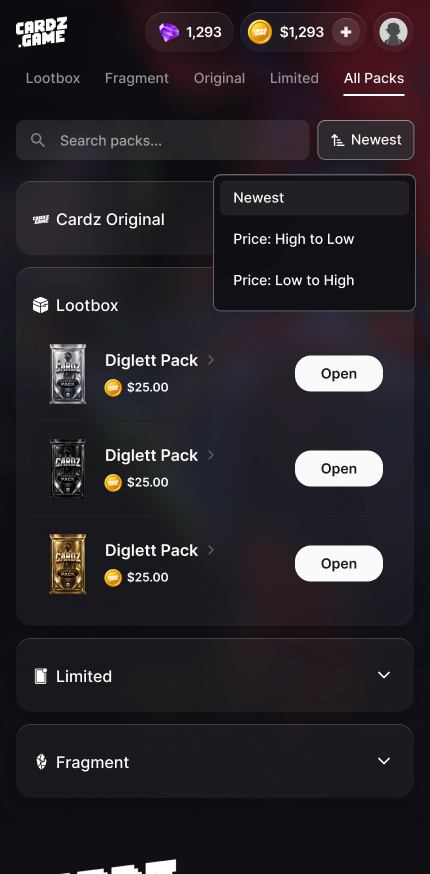
Follow the picture:
- Tap
All Packsfirst. - Use category tabs to narrow the list.
- Open a pack detail page instead of guessing from the card image.
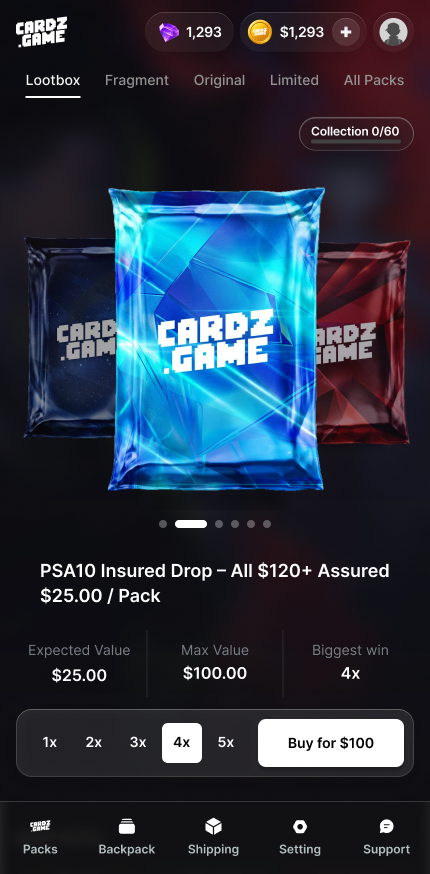
Follow the picture:
- Read
Expected Value,Max Value,DROP RATES, andCHASE CARDS. - Understand that odds are not a promise.
- Tap
Open Nowonly when the pack, price, and odds make sense to you.
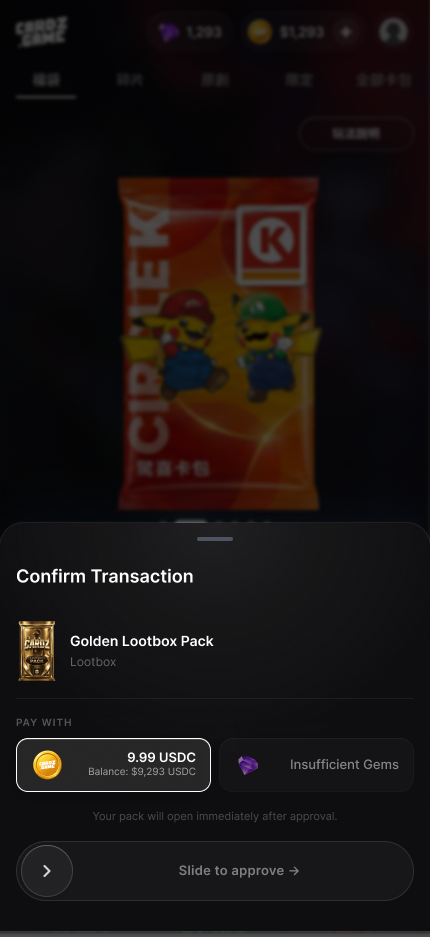
Follow the picture:
- Check the pack name and amount.
- Check payment method such as
USDCorGEMS. - Use
Slide to approve →only when all details match.
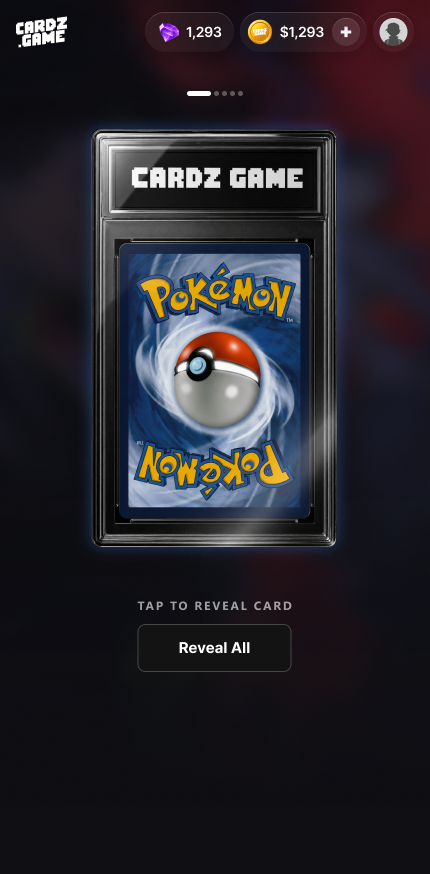
Follow the picture:
- Tap
TAP TO RIP PACK. - Tap
TAP TO REVEAL CARDorReveal All. - After viewing the result, decide what to do next.
✅ Step-by-step
Section titled “✅ Step-by-step”Step 1: Choose category.
Section titled “Step 1: Choose category.”All Packs shows everything. Lootbox is the lootbox pack type. Fragment / Fragments are fragments, not lootboxes.
Step 2: Read pack detail.
Section titled “Step 2: Read pack detail.”Review possible outcomes, odds, price, Expected Value, and Max Value.
Step 3: Confirm transaction.
Section titled “Step 3: Confirm transaction.”Check pack name, currency, amount, and balance before sliding.
Step 4: Reveal results.
Section titled “Step 4: Reveal results.”Use TAP TO RIP PACK, then reveal cards, then check My Backpack.
🔎 UI labels you may see
Section titled “🔎 UI labels you may see”| UI label | Plain meaning | What to do |
|---|---|---|
DROP RATES / Drop Rates | Odds table | Read before opening. |
CHASE CARDS | Featured chase cards | Use it to understand possible highlights, not guarantees. |
Open Now | Open or start payment | Tap only after reading details. |
Confirm Transaction | Final payment confirmation | Check pack name, amount, and payment method before approving. |
Insufficient Gems | Not enough GEMS | Do not repeatedly approve; add funds or choose another method. |
🧯 If you feel stuck
Section titled “🧯 If you feel stuck”- If you do not understand the odds, do not open yet.
- If price or currency looks wrong, close the modal and contact support.
⚠️ Important notes
Section titled “⚠️ Important notes”Max Valueis not guaranteed return.Biggest winis not a promise.- Opening a pack is a final action in most cases.
🙋 Tiny questions people ask
Section titled “🙋 Tiny questions people ask”| Question | Simple answer |
|---|---|
| Why did I not get the chase card? | Because pack results are random and odds do not guarantee a specific card. |
✅ Before you continue
Section titled “✅ Before you continue”Do these tiny checks before you tap the next button:
- Pack name is correct.
- Price and currency are correct.
- You read odds and understand randomness.
- You know where to find the result.