Account and Login
🎯 What you will learn
Section titled “🎯 What you will learn”- How to use
Continue with email. - How wallet connect should feel.
- Where
My Profile,Referral,Language, andPrivacylive.
🧒 Super simple version
Section titled “🧒 Super simple version”Your account is your key. Use email if you want simple login, or connect a supported wallet if the app asks for it.
🖼️ Screen guide
Section titled “🖼️ Screen guide”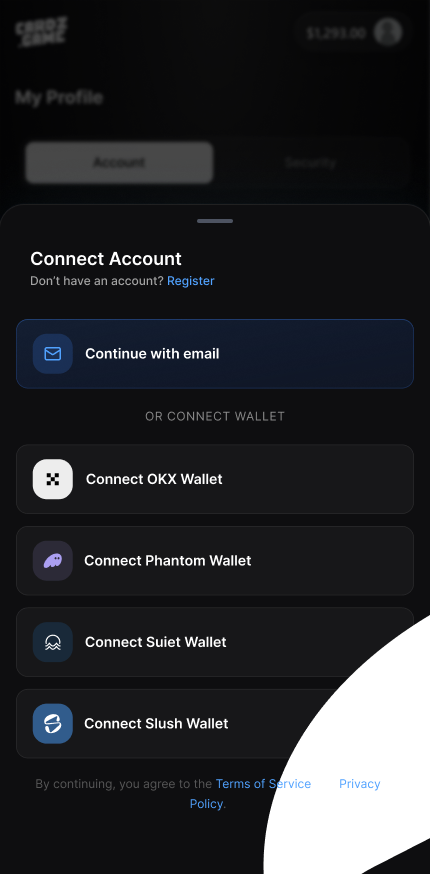
Follow the picture:
- Choose
Continue with emailor a supported wallet. - Check that you are on Cardz.game.
- Never type a private key or recovery phrase.
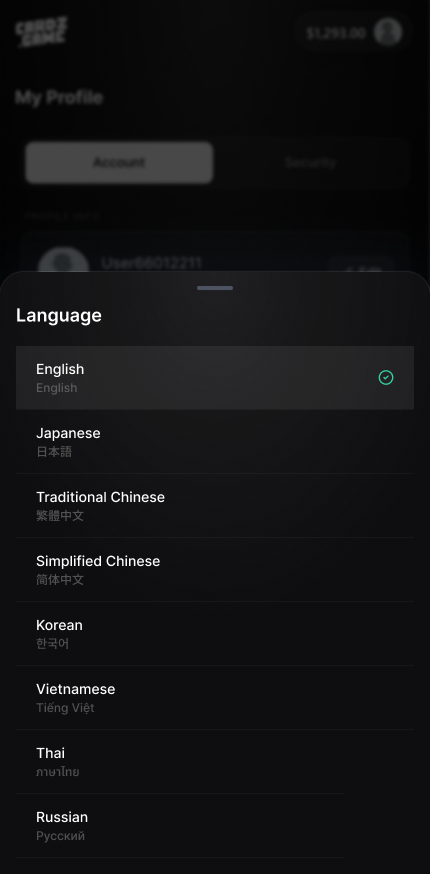
Follow the picture:
- Open
My Profile. - Find
Profile Info,Referral,Language, andPrivacy. - After changing language, return to a main screen and check the text.
✅ Step-by-step
Section titled “✅ Step-by-step”Step 1: Choose login method.
Section titled “Step 1: Choose login method.”Tap Continue with email for email login, or choose a wallet like OKX Wallet, Phantom Wallet, Suiet Wallet, or Slush Wallet.
Step 2: Complete only the safe prompt.
Section titled “Step 2: Complete only the safe prompt.”A wallet may ask you to approve connection. It should not ask for your recovery phrase.
Step 3: Open profile settings.
Section titled “Step 3: Open profile settings.”Use My Profile to check profile info, referral, language, and privacy.
🔎 UI labels you may see
Section titled “🔎 UI labels you may see”| UI label | Plain meaning | What to do |
|---|---|---|
Continue with email | Email login | Use it when you do not want wallet login. |
Connect Wallet | Wallet login | Approve only safe connection prompts. |
My Profile | Profile area | Use it for profile, referral, language, privacy. |
Language | Display language | Change app language if the option is available. |
🧯 If you feel stuck
Section titled “🧯 If you feel stuck”- If a wallet popup is scary, cancel first and ask support.
- If you used the wrong email, log out and sign in with the correct one before opening packs.
⚠️ Important notes
Section titled “⚠️ Important notes”- Cardz.game should never need your private key or recovery phrase.
- Do not post screenshots showing user ID, wallet address, or referral code.
🙋 Tiny questions people ask
Section titled “🙋 Tiny questions people ask”| Question | Simple answer |
|---|---|
| Can I use email only? | If the app shows Continue with email, yes. Some actions may still require wallet/payment confirmation. |
✅ Before you continue
Section titled “✅ Before you continue”Do these tiny checks before you tap the next button:
- You are on the real Cardz.game screen.
- You did not share secrets.
- You know where to find
My Profile.