Wallet and Funds
🎯 What you will learn
Section titled “🎯 What you will learn”- Where to add funds.
- How to avoid wrong-network deposits.
- Why
Credits,Points, andGEMSshould not be merged in your head. - What to check before withdrawal or confirmation.
🧒 Super simple version
Section titled “🧒 Super simple version”Money screens are slow screens. Read every line before sending funds or approving a transaction.
🖼️ Screen guide
Section titled “🖼️ Screen guide”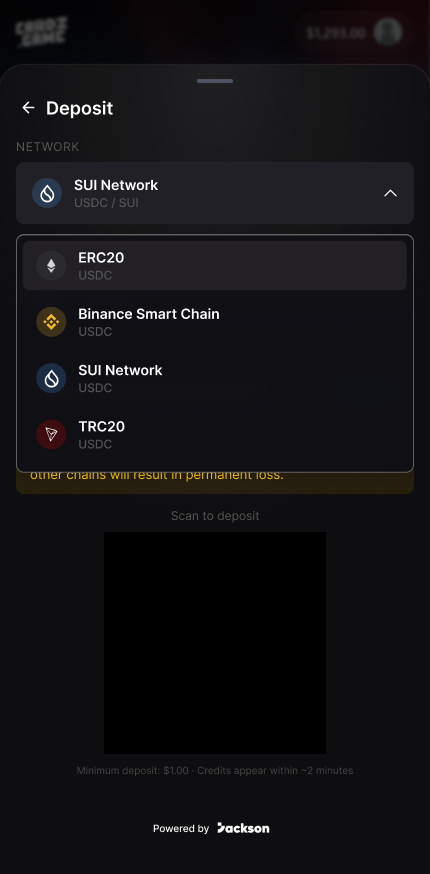
Follow the picture:
- Tap
Add FundsorDeposit. - Check currency such as
USDC,SUI, orGEMS. - Check network and address before sending anything.
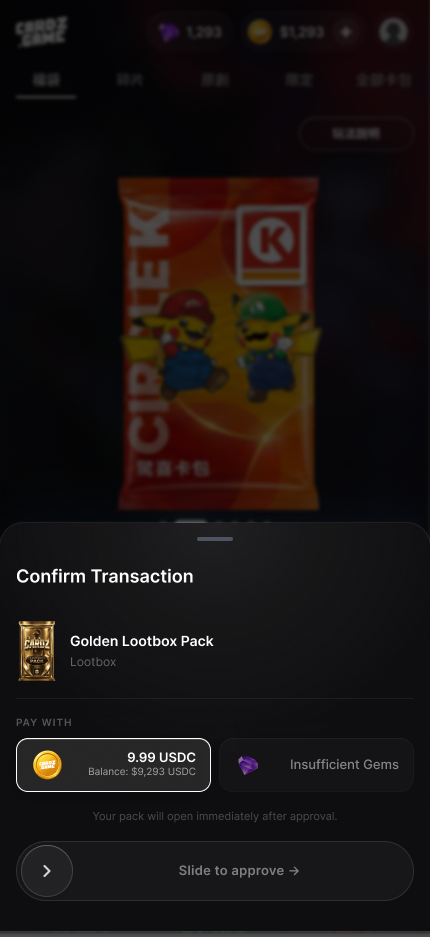
Follow the picture:
- Confirm amount.
- Confirm balance type.
- Approve only if the pack and payment method are correct.
✅ Step-by-step
Section titled “✅ Step-by-step”Step 1: Open funds area.
Section titled “Step 1: Open funds area.”Look for Add Funds, Deposit, or wallet balance in the app.
Step 2: Choose the exact method.
Section titled “Step 2: Choose the exact method.”Read whether the screen shows USDC, SUI, GEMS, or another label.
Step 3: Check network warning.
Section titled “Step 3: Check network warning.”Wrong network or wrong address can cause loss. Stop if the app and wallet do not match.
Step 4: Confirm slowly.
Section titled “Step 4: Confirm slowly.”For withdrawals or approvals, check amount and destination again.
🔎 UI labels you may see
Section titled “🔎 UI labels you may see”| UI label | Plain meaning | What to do |
|---|---|---|
Add Funds | Add balance | Start here when you need more funds. |
Deposit | Deposit funds | Use only after checking network and currency. |
GEMS | A balance label in the UI | Do not assume it equals Credits or Points unless the app says so. |
Withdraw | Move funds out | Check destination and fees carefully. |
🧯 If you feel stuck
Section titled “🧯 If you feel stuck”- If the wallet network does not match the app screen, cancel.
- If a transaction is pending, do not spam the button; wait or contact support.
⚠️ Important notes
Section titled “⚠️ Important notes”- Wrong-chain deposits may be hard or impossible to recover.
- Never share wallet secrets.
- Credits, Points, and GEMS are separate labels unless the current app states otherwise.
🙋 Tiny questions people ask
Section titled “🙋 Tiny questions people ask”| Question | Simple answer |
|---|---|
| Are GEMS the same as Points? | Do not assume so. Use the label and explanation shown on the current screen. |
✅ Before you continue
Section titled “✅ Before you continue”Do these tiny checks before you tap the next button:
- Currency is correct.
- Network is correct.
- Address is correct.
- You understand the confirmation action.