Activity and Buyback
🎯 What you will learn
Section titled “🎯 What you will learn”- Where to find opening history.
- How to use
View Opening. - What
SellandBuybackmean. - Why buyback is not a refund.
🧒 Super simple version
Section titled “🧒 Super simple version”Cardz Activity is your history page. Use it when you need proof of what happened.
🖼️ Screen guide
Section titled “🖼️ Screen guide”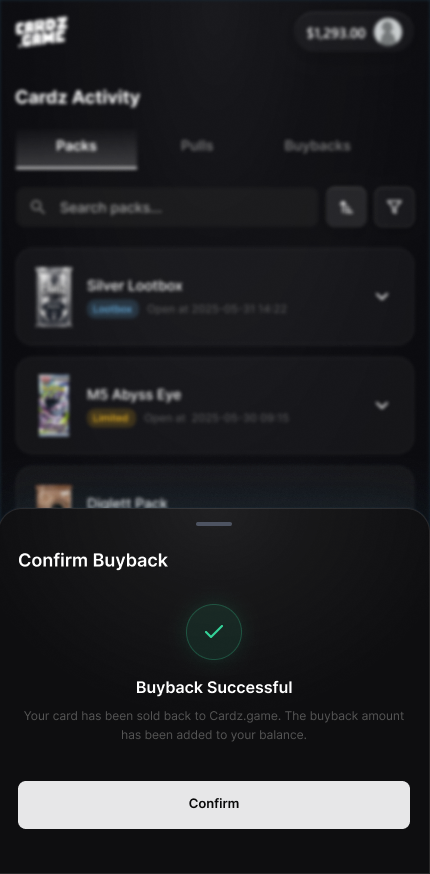
Follow the picture:
- Open
Cardz Activity. - Use
View Openingto inspect a pack result. - If
Sell,Buyback, orConfirm Buybackappears, read the price before confirming.
✅ Step-by-step
Section titled “✅ Step-by-step”Step 1: Open Cardz Activity.
Section titled “Step 1: Open Cardz Activity.”Find the pack opening or transaction you want to check.
Step 2: Tap View Opening.
Section titled “Step 2: Tap View Opening.”Use it to review the result and compare with My Backpack.
Step 3: Read buyback options.
Section titled “Step 3: Read buyback options.”Sell or Buyback may appear only when eligible.
Step 4: Confirm only after reading price.
Section titled “Step 4: Confirm only after reading price.”Confirm Buyback is an action, not a question.
🔎 UI labels you may see
Section titled “🔎 UI labels you may see”| UI label | Plain meaning | What to do |
|---|---|---|
Cardz Activity | History page | Check openings, cards, and related actions. |
View Opening | View one opening | Use it to inspect the result. |
Sell / Buyback | Sell-back option | Only available when the app shows it. |
Confirm Buyback | Confirm sell-back | Check price and asset first. |
🧯 If you feel stuck
Section titled “🧯 If you feel stuck”- If Backpack and Activity do not match, take screenshots of both and contact support.
- If buyback price surprises you, do not confirm until you understand it.
⚠️ Important notes
Section titled “⚠️ Important notes”- Buyback is not a refund.
- Eligibility, price, and timing can change.
- Do not promise yourself a future buyback if the current screen does not show it.
🙋 Tiny questions people ask
Section titled “🙋 Tiny questions people ask”| Question | Simple answer |
|---|---|
| Can I use buyback as a refund? | No. Treat buyback as a separate sell-back action shown only when eligible. |
✅ Before you continue
Section titled “✅ Before you continue”Do these tiny checks before you tap the next button:
- You checked the correct opening.
- You compared with Backpack if needed.
- You read the buyback price before confirming.